PXN
PXN 2113 Pro Flight Simulator Joystick with Vibration Function and Throttle for Windows PC
PXN 2113 Pro Flight Simulator Joystick with Vibration Function and Throttle for Windows PC
Couldn't load pickup availability
Experience Precision with the PXN 2113 Pro Flight Simulator Joystick


Features & details
- 1.【Vibration Function】According to the game scene,The full rated vibration engine can produce different vibration effects, The vibration switch is located at the bottom of the joystick, please switch to "ON". If the vibration intensity is less than 20%,Please set the vibration strength in the driver to 50% or higher) Compatible with almost flight games:World of Tanks,World of Warplanes,War Thunder,Assault Horizon,Microsoft Flight Simulator,X Plane 10,etc.(Note:Minecraft,Asphalt 8 not supported).
- 2.【compatibility】:PXN 2113 Flight Simulation Rocker Compatible with PC / Desktop Computer / Notebook, compatible with Windows 7/8/10 system, suitable for Suitable for "Microsoft Flight Simulator 2020", "X-Plane 11," World of Warplanes, "Ace Air Force", "War Thunder", "Ace Combat", "Eagle Strike Sky 2", And "Battlefield 1942", And All PC Flight Simulation Games, [NOTE]: (Do Not Support Mac / Apple Computers / Apple Device / PS3 / PS4 / Xbox One / PS5 / NINTENDO SWITCH.
- 3. 【Connection Question】Please open the computer first, then connect the PXN-2113 joystick, plug and play, no need to install the driver. If the device does not work, please download the PXN2113 driver, please visit the E-PXN official website: Home - Support - Tool -PXN JOYSITCK SOFWARE, download and install driver, after connecting, please enter the game to make the game interface settings and mode selection if you There is any "connection problem", please give c-zone mail, thank you
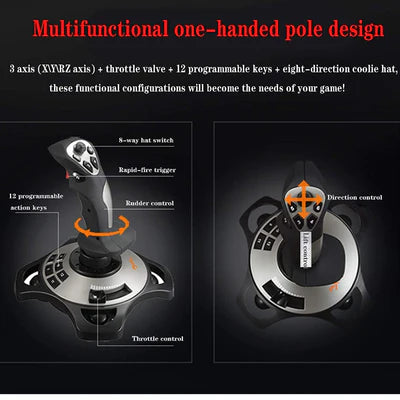
- 4.【Multifunctional Design】 You can quickly control, direct bitter direction, to achieve the left, right upper four directions and 45 degrees, convenient for the conversion angle of the game, the battle is a look, four axes (X / Y / RZ axis) + accelerate Valve + 12 programmable buttons + eight-way cover, integrated vibration motor, motivation experience during the game, these functional configuration allows you to enjoy the happiness of the game.
- 5. 【Enjoy it】 PXN-2113 flight controller manipulate swing chasing military machine, successfully blocking, aiming, pulling trigger, shooting is as simple, download PXN-2113 driver, controller software supports keyboard button setting, dead zone Adjustment, button mapping, axial map, etc., etc., according to the game needs to create your personal customization, the flight controller design is ergonomic, and it will not feel tired for a long time.
Realistic Control for Flight Enthusiasts
The PXN 2113 Pro Flight Simulator Joystick is designed specifically for aviation buffs and gamers alike. Its ergonomic design allows for comfortable long-term use, so you can experience extended flying sessions without discomfort. Furthermore, the joystick's responsive controls offer fine tuning and high precision, which is essential for anyone looking to master their flight simulations. The integrated vibration function enhances realism, making your virtual flying experience more immersive than ever before.
Throttle Function for Enhanced Gameplay
Not only does this joystick come with a high-quality throttle function, but it also provides unmatched control over your aircraft's speed and maneuvers. Many flight simulators require this level of detail, and the PXN 2113 ensures that you can execute complex flight patterns smoothly. The additional throttle lever gives you that edge, so you can ascend or descend effortlessly. This enhanced control ensures you are ready for any in-flight challenges.
Compatible and Easy Setup for Windows PC
One of the best features of the PXN 2113 Pro Flight Simulator Joystick is its seamless compatibility with Windows PCs. Setting up the joystick is straightforward, allowing you to jump into your flight simulation without any hassle. Just plug it in, install the drivers if necessary, and you're set to take to the skies. Whether you're a novice or a seasoned pilot in the simulator world, this joystick offers an easy-to-use solution designed for all skill levels.